
Due to the upcoming deprecation of XUL-based add-ons, I am stopping development and support for this add-on. E-mail me if you’d to take over development.
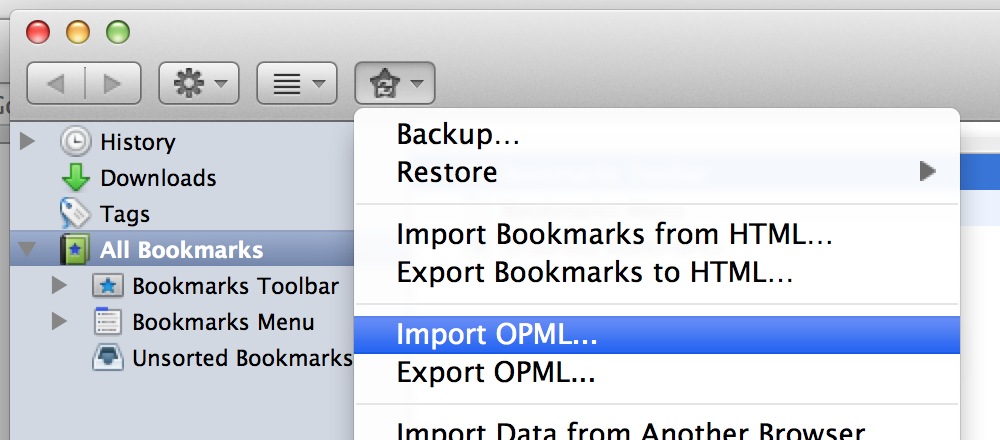
OPML Support is an extension for the Mozilla Firefox Web browser that adds OPML import/export functionality to the Firefox Bookmarks manager. OPML is a file type that is widely used to distribute lists of RSS/newsfeeds.
When exporting, you can choose to export your livemarks (feeds), bookmarks, or both. When importing a file, you can choose to import only the livemarks, only the bookmarks, or all of the links listed in the file. You can also choose whether to import/export links in their folder hierarchy.
If you’re having trouble with the extension or would like to see a new feature added, you can e-mail me at cfinke@gmail.com.
Note: watch the OPML Support section of my blog for information on updates to this extension.
I really like this extension, but was wondering if it was possible to add functionality to export / import selected Bookmarks / Bookmark Folders. This would be a great feature that I’m sure a lot of people would use.
Thanks,
-Matt-
I was using this extension some time ago, but it lacks proper accentuation support. There’s no way to fix this?
Appeared to install fine but now I’m guessing it doesn’t work with OSX 10.3. Recieving an error message (file size) when I atttempt to upload the file.
I agree with the ability to export some bookmarks, either selected, or even by folder.
Great extension.
I know this is a “quick & dirty” approach, but the OPML file is a text file that you could open using any text editor and cull out the feeds you don’t want. MS users could open it in Notepad or WordPad, and just delete the lines containing the sites in which you’ve no interest.
Yeah, it’s manual labor, at that point, but… Waaaaa. Cry me a river.
It works and you’ve already got the software to do it; no downloads required.
— Infinite
update and point to :
https://addons.mozilla.org/en-US/firefox/addon/2625
your secure page at mozilla.org
desperately looking for an exporter for Partial bookmark (a sub folder anf folllower link
I try this plugin, this is not the one
but thanks for your plugins, in general for all the peaople like me
best regards
i liked it.
I could not to Installed my firefox2.007…
WHY???
I could not to Installed my firefox2.007…
WHY…?
Doesn’t work anymore (at least under firefox 2.07).
Tries to download a 4Mb+ file and fails with a -71 error code after a couple of seconds.
Any plans for an update so it works with the current Firefox version? I’m eager to try the extension (and I’m surprised OPML functionality isn’t built into the live bookmarks to begin with!)
Thanks!
liberrian: I’m working on it right now; most of my other extensions are FF3-compatible, but the bookmark-related ones take a little more work.
Hey, when will you be putting this update in the official Mozilla Firefox Add-ons directory. Your version there is still at 1.3. I only truly trust extensions from the Add-on directory.
i like it!
http://chinaimportexport.wetpaint.com/
how to export my feed?
http://chinaexports.b2b.hc360.com/
http://chinaimportexport.wetpaint.com/
http://chinaimportexport.wetpaint.com/rss2_0/pageReport/updated
Hi,
the opml file isnt there..
can you please email me the file of the top 100 blogs?
Regards,
Ronak.
I’m getting a failed due install message,
Not a valid install package
-207
anyone else, or should I be looking at the system?
The plugin doesnt work with 3.0b5.
It just crashed the browser.
I know you don’t list support for this version yet…but thought I’d make sure you know support would be appreciated.
This is avery useful plugin.
This bookmark extension does not display (therefore is not available) with Firefox 3.0 iMac version 10.1.5
I use FF 2.0.0.14. I installed OPML Support 1.5 and it appears in my Add-ons list. But there is no way to start it. In the Add-on list the field for OPML Support shows a greyed-out OPTIONS button, and all I can do is either disable it or is greyed out, and all I can do is either disable it or uninstall it.
How can I start using it?
Thanks for your efforts
OOPS! Just correcting the text of my post of a few minutes ago.
I use FF 2.0.0.14. I installed OPML Support 1.5 and it appears in my Add-ons list. But there is no way to start it. In the Add-ons list, the field for OPML Support shows a greyed-out OPTIONS button, and all I can do is either disable it ore it or uninstall it.
How can I start using it?
Thanks for your efforts
Firefox v3.0
When I try to export just the Live Feeds with or without preserving the folder structure it just hangs, no output whatsoever. When I close the dialogue FF stops, so it looks like it’s crashing the program.
Does it work with v3.0?
I’m using Firefox 3.0, and OPML Support 1.5. I exported my feeds from IE7 as OPML. In Firefox, I used Import OPML, and selected the defaults (create folders as in the OPML file, and not converting to bookmarks) , but it although it said it was Processing the file, it never finished. Nothing was ever imported.
I have the same problem as the previous user … hang (I guess?… shows the “processing” for the longest time) on import with no result…
HOW DO YOU INSTALL opml?
EMAIL ME @ tmofocus@yahoo.com
Does not work. Same as 24 and 25.
WHY IS THIS NOT BUILT IN TO FF3??
Very disappointing. Oh well, back to IE7.
After having problems with a hanging pc using the 1.5 version I tried the latest experimental version 1.5.2 This caused a Parse failure saying :”an unknown entity”
The OPML import function does not seem to work. It says it’s processing, but then it hangs.
(Re 27)
Thanks for fixing this Chris! 1.5.2 works ok.
(Still think it should be built-in though.)
Hey, when will you be putting this update in the official Mozilla Firefox Add-ons directory. Your version there is still at 1.3. I only truly trust extensions from the Add-on directory.
Appeared to install fine but now I’m guessing it doesn’t work with OSX 10.3. Recieving an error message (file size) when I atttempt to upload the file.
Doesn’t work anymore (at least under firefox 2.07).
Hi,
I’m having trouble importing an IE7 generated OPML file. On both Mac and WinXP and in both the latest versions of FF I get the following error msg: XML-parse failure: Undefined entity Location: chrome://opml-support/content/import-wizard.xul Row30, Colomn 3:
________________^
What can be wrong?
Thanks for your help
Hi
I have the same problem than Remco.
chrome://opml-support/content/import-wizard.xul
I can’t import my files …
I have the Firefox 3 and XP …
Have a nice day, Thanks
Hi
I have a similar problem.
XML-parse failure: Undefined entity Location: chrome://opml-support/content/export-wizard.xul Row33, Colomn 3:
I can’t export my files …
I have the Firefox 3.03 and XP …
Any suggestions.
“Erreur d’analyse XML : entité non définie
Emplacement : chrome://opml-support/content/export-wizard.xul
Numéro de ligne 33, Colonne 3 :
—————-^”
This is the error I have when I try to export my bookmarks
(FF 3.03fr, Vista64 ult, opml 1.52)
In fact I installed OPML trying to fix a bug with my Mozilla : the native ‘HTML export” fonction does not work anymore (since around a month)
I still can export to the json format but I can’t import this save so I am stuck…
If anyome has the same problem and an idea…
Hey all,
I’m a bit new to OPML and have a question (lazyweb request, i guess).
I’m looking for something that takes all my bookmarks that I have, strips them of their RSS feeds, and puts it properly into one OPML file which I can then upload to google reader or something.
I thought that this extension might be close, but after installation and exporting all bookmarks to an opml file called bookmarks, google reader is telling me that it can’t read the file.
am I missing something?
please email @ eag3000 at gmail
thanks
I can’t import my files … :(
Just a little feedback in case it helps others, using Firefox 3.0.3 I managed to import an opml generated by Sage wit the following 2 caveats:
1/ OPML support stopped importing on finding an empty feed in the opml file ( ) – I had a blank entry in the opml as that’s what Sage does if you put a blank (spacer) line in the list of fields. After deleting the entry using notepad all the feeds infor imported fine
2/ When performing the import the dialog box never showed that the import was complete. After a couple of tries I figured out that it was importing ok and closed the dialog using Cancel. So now I have to watch the disk activity to see when the import is complete.
Other than those glitches, no problem.
Thanks.
Sue is correct. I had an empty directory which prevented complete import.
FFX 2.0.020 XP,
install. fine, doens’t work
error “Erreur d’analyse XML : entité non définie
Emplacement : chrome://opml-support/content/export-wizard.xul
Numéro de ligne 33, Colonne 3 : ”
what a pity to claim a plugin available if the code is at the begining wrong…
help me to download this addons
[…] Ich habe gerade eine Firefox-Extension gefunden, welche OPML-Dateien in den Firefox-Browser einbindet. Sehr nettes Tool, das auch immer noch weiterentwickelt wird. […]
In regards to those asking why this feature or are not built-in to Firefox, and threatening to go back to Microsoft Bloatware Products:
The light nature, plug ability, and modularity of Firefox is a large part of what spawned its popularity, and of what continues to make it a great tool to this day. If you need every feature under the sun, and the kitchen sink, pre-installed, you probably _should_ stick with the Microcrud that came pre-installed. Or maybe you could launch a Firefox fork (“Bloatfox” perhaps?) that comes pre-configured with all the stuff that nobody will ever need.
When click to export livemarks it says it is processing and stays like thaat for hours and nothing happens!
Installed. Restarted. Exported 50 RSS Feeds. Imported into Google Reader. Perfect. Thank you.
Does this not work with a Mac? Install seemed to go fine, but no export feature. Thanks.
The Plug-In’s Export is not compatible with the most popular free soft – Juice Podcast Receiver (all versions, including standard 2.0 and 2.22a-b): maybe, because of opml version difference or anything else. While importing to the Juice, the Podcast Receiver importing site-address at the place of the feed-address – or doesn’t importing anything.
Please, check compability with Juice Receiver 2.22!
I installed OPML support version 1.6 in Firefox 3.5.8 to export bookmarks (about 35 thousand of them) to SiteBar. SiteBar did not accept the OPML file. I modified the OPML file as follows:
1. Every /> newline ctrl-Q-J<)
2. Byte values hex 0D and hex 19 (there were about 200 of them) changed to space (in Bless).
After that the OPML file was accepted by SiteBar.
It would be nice if the OPML support could manage without these correction of the result file. I know that there would not be any non-printable chars in the bookmark-source. Still, OPML support add-on would have some strategy for such a situation.
Otherwise, thanks. It works and that is most important, at least for me.
Import does not seem to be able to handle file containing extremely large numbers of bookmarks, I have tried it in 2 different installs of Firefox running on PCLinuxOS (same computer, reinstalled OS twice though) and each time it hung without ever finishing the import, I tried cancelling and restarting a couple times with the same results every single time, it never once did finish importing. Seriously now, people reported this problem back in 2008 and it STILL hasn’t been fixed, WTF??
This does not preserve tags: It seems to export them along with everything else, as I can see them in the generated file, but importing that file results in all of the tags being removed from the imported bookmarks.
This extension would be absolutely perfect if it handled importing tags correctly.
I tried Brief before and I didn’t like it I prefer Newsfox which is a full-featured rss reader inside firefox.
Is there a tutorial available that can help me with RSS feeds? I’m a new blogger and RSS is the last mountain I have to climb before I can call myself freelance. I know that most blog hosting sites (WordPress, Blogger) offer a plug-in for your blog, but I want to use RSS for my website. Any links/tips would be greatly appreciated.
Using OPML Support 1.6 on FF 3.6.15.
Using OPML as a backup tool for bookmarks, I have exported all bookmarks and imported all bookmarks; always preserving folder structure.
I am very, very displeased to see that after a full import, all “date” attributes (added, modified) of all bookmarks were not maintained, but instead were set to contain the date-time at which the bookmarks were imported. Furthermore, the “visit date” field was blanked. For this reason — non-restoration of important data — I intend to seek an alternative tool.
Like other users, I observed that OPML Support appears to be hung or not responding while taking an inordinately long time. I propose that a progress indicator be added to the application.
Hi, I just downloaded this app, but it doesn’t seem to work in the current version of Firefox… that, or I’m just not seeing where it is in the new configuration. There doesn’t seem to be a “Library” page anymore, and the “Organize” option doesn’t show up in any of the Bookmark dropdowns. Am I missing something, or is there a newer version I should be using?
Thanks.
Dave – There’s now an OPML button (with a round icon) in the Bookmarks Manager.
Just installed this addon. Works like a charm…
Thanks Christopher! :)
I have used that addon for a long time and never had any problem. But now (newest version), if I export my bookmarks in an OPML file, I cannot import that file. It is says:
“The OPML document you selected is not well-formed and cannot be imported”
This is odd, any way to fix it? Should I take care of the accent (I am French and there is a lot of them)?
opml support not showing in firefox 20 (Mac OS X 10.7)
I’ve submitted an update to OPML Support on Mozilla Add-ons that will fix this.
Just upgraded to Firefox 20 (Windows 8).
OPML support missing.
Removed OPML Support 1.6 and added OPML Support 2.
Still don’t see OPML Support on Bookmarks Library page.
Version 3 should fix the problem, but you’ll have to look inside the menu of the last button in the Bookmarks Manager.
https://addons.mozilla.org/en-US/firefox/addon/opml-support/versions/?page=1#version-3
When is the new update going to show up in Firefox site? I’ve updated to FF20 and the addon doesn’t appear anymore.
I’m submitting an update to Mozilla Add-ons later this week; it will hopefully be reviewed and approved quickly.
Updated but still doesn’t appear anymore!
Version 3 should fix the problem, but you’ll have to look inside the menu of the last button in the Bookmarks Manager.
https://addons.mozilla.org/en-US/firefox/addon/opml-support/versions/?page=1#version-3
Yep, it’s there.
Thanks Chris
This nice addon unfortunately don’t seems to save OPML files in Aurora (firefox beta version). It works flawlessly in regular Firefox versions, till 21.0.
I’ve submitted an update on AMO; it should be available shortly.
Importing OPML doesn’t work. When I press OK, “Processing bookmarks…†appears in the dialogue box then nothing else happens. Please advise.
I’ve submitted an update on AMO to fix this; it should be available shortly.
Your plugin is smart and beautiful but it’s not work in latest 31. Can you please fix it :)